
Frigidaire
AB ElectroluxHouse & Home
4.3816.00 Reviews
- Version
- 4.29
- Installs
- 100.00K
- Age Rating
- Everyone
Screenshots
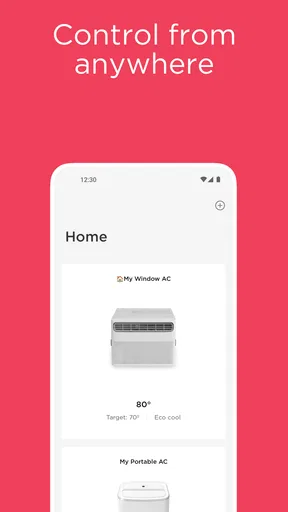
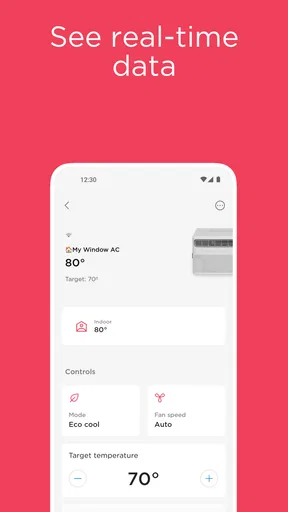
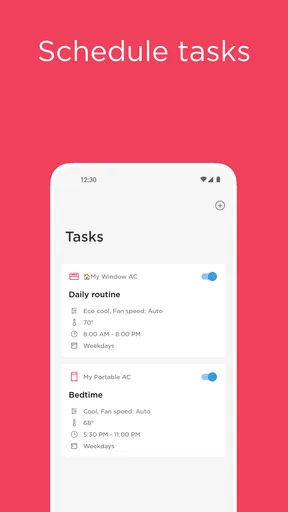
Our Review of Frigidaire
 Analysis by Appyee
I approach connected-home apps with a little more caution than ordinary utility apps. A remote control for a washing machine, refrigerator, oven, or other appliance can be genuinely convenient, but it also sits close to daily routines, household habits, and personal accounts. Frigidaire, developed by AB Electrolux, is designed for that specific space: it connects compatible Frigidaire appliances with a phone so you can manage them from one place. After spending time with it, I see it as a practical companion for people who already own supported connected appliances, rather than an app that makes sense on its own.
The app is free and aimed at Everyone, which makes the initial commitment easy. It has reached over 100 thousand installs and holds a 4.3 average from around 5.6 thousand ratings, enough to suggest that many owners find the basic idea useful. Those figures do not make it automatically trustworthy, though. With a connected-home app, I want to know what I can control, what I am being asked to connect, and whether I can make sensible choices without feeling pushed into a larger ecosystem.
How Frigidaire fits into a connected home
The first thing to understand is that Frigidaire is not a general smart-home dashboard. Its purpose is narrower and more useful: controlling connected Frigidaire appliances in the home. That focus is a strength when your kitchen or laundry room already contains compatible equipment. Instead of opening a separate control for every appliance, you have a single Frigidaire-focused place to check the devices that belong to the brand.
That also creates the app’s biggest limitation. If your home contains appliances from several manufacturers, this will not replace a broad smart-home platform. You may still need the manufacturer’s app for another brand, and the experience can become fragmented. I would choose Frigidaire when the appliances I care about are Frigidaire products and I want the manufacturer’s own control layer. I would look elsewhere if my priority were one unified interface for a mixed collection of household devices.
The app runs on Android with a minimum operating system of 11. That is a reasonable requirement for a current connected-appliance tool, but it matters if you are using an older phone that still works perfectly for ordinary tasks. Before planning a household setup around it, I would check the operating system on every phone that needs access, especially if several family members share responsibility for cooking, laundry, or appliance monitoring.
In everyday use, the value is less about pressing a button from the sofa and more about reducing small interruptions. A person preparing to leave home can check the connected appliance rather than walking back to the kitchen. Someone managing laundry can use the phone as a second place to keep track of an appliance instead of repeatedly checking it in person. These moments are modest, but they are exactly where a manufacturer app earns its place.
What I would check before creating an account
I would begin with the appliance, not the app. Confirm that the Frigidaire model is intended to work with connected controls, then make sure the phone and home network are ready. This avoids a common frustration: installing the software first, assuming every Frigidaire product will appear, and only later discovering that the particular appliance cannot be added in the expected way.
I would also decide who genuinely needs access. If one person handles all appliance management, a single account may be enough. If several people need control, think through whether each person should use their own account or whether the household will share one login. That decision affects convenience and accountability. A shared login is simple, but it makes it harder to tell who changed a setting. Separate access may be cleaner, provided the app and the household’s chosen setup support it comfortably.
During setup, I would read every screen rather than tapping through automatically. Connected appliances can involve account details, network information, device identifiers, and usage-related information. I am not interested in guessing what an app collects from a screen I have not seen. My practical rule is simple: connect only the appliances you intend to manage and review each visible choice before accepting it.
This approach is especially useful in a shared home. A guest, tenant, child, or visiting relative may need to use the appliance itself without needing access to the phone account. Keeping physical use and remote account access separate is a sensible boundary. The app should serve the people responsible for managing the appliance, not become an automatic invitation for everyone who enters the kitchen.
Controls that matter more than novelty
The most convincing part of Frigidaire is the basic control relationship between the phone and the appliance. The app is worthwhile when it saves a trip, makes a status check easier, or helps you organize a routine around a connected Frigidaire product. Those benefits are practical rather than flashy, and I prefer that. A household app does not need entertainment features; it needs predictable behavior and clear feedback.
One useful habit is to treat the app as a confirmation tool, not as a replacement for common sense. If I am leaving home, I would use it to check the appliance, then still rely on the appliance’s own physical state and the situation in the room. If food, heat, water, or a running cycle is involved, a remote screen should not encourage careless assumptions. A phone can show a control state, but it cannot remove the need to understand what is happening around the appliance.
Another practical tip is to keep the device list tidy. If you move appliances, change households, or stop using one of them, remove or reorganize it when the available controls allow. A crowded list increases the chance of selecting the wrong appliance, particularly when several products have similar names. Giving each connected appliance a clear, recognizable label is a small step that can prevent a surprisingly large amount of confusion.
I also recommend deciding on a normal operating routine before relying on remote control. For example, use the phone to check whether a task is complete, but use the appliance’s physical controls for unusual situations. This creates a fallback habit. If the phone is unavailable, the network is interrupted, or the app needs attention, the household can still operate the appliance normally rather than treating the app as the only doorway.
Trust begins with visible choices
For me, trust in a connected-home app is built through understandable account controls and visible user choices. The developer is AB Electrolux, a name directly associated with the Frigidaire product ecosystem, so the app has a clear manufacturer relationship rather than appearing to be an unrelated remote-control utility. That is reassuring in context, but it does not mean I would skip the privacy and account screens.
I would pay attention to whether the app lets me review connected appliances, manage account details, and remove access in a straightforward way. I would also look for clear prompts around notifications, network access, and any optional services. The important distinction is between a choice I can understand and a permission I accept simply because setup will not continue otherwise. If a setting is optional, I prefer to leave it off until I know I need it.
The app’s Everyone age rating makes it approachable for a household with different age groups, but an age rating is not a substitute for supervision or account discipline. Younger family members may be perfectly capable of using an appliance while still not needing remote account control. I would keep sign-in information private and avoid leaving the account open on a phone that is regularly shared.
Notifications deserve the same careful treatment. Helpful alerts can reduce the need to check an appliance repeatedly, but excessive alerts can become background noise. I would begin with only the notifications that support a real routine, then adjust them after a few days. A notification that arrives at the wrong time or for an event I never act on is not useful simply because it exists.
Where personal data becomes more sensitive
Connected-appliance use can reveal patterns even when the app is not intended as a lifestyle journal. The timing of laundry, cooking, or other appliance activity may say something about when people are home and how the household operates. I do not assume what Frigidaire does with such information beyond what is visibly explained in the app’s own privacy and account materials. Instead, I treat the connection as something worth managing deliberately.
My advice is to inspect the privacy information during setup and again after major app updates. Look for the categories of information involved, the reasons for collection, retention choices, and available account controls. These details matter more to me than a polished interface. If the wording is difficult to understand, I would take the time to clarify it before connecting every appliance in the house.
There is also a difference between necessary connection data and optional convenience. An appliance may need certain information to communicate with the app, while a separate feature may request additional access for notifications or related functions. I would not treat all requests as equally important. Review them individually, choose the minimum that supports the way you plan to use the app, and revisit those choices if your habits change.
A realistic example is a family that installs the app on one person’s phone, then later adds a second household member. Before doing that, I would review whether the second person needs full account access or only occasional help. I would also check whether old phones still have access after someone leaves the household. This is ordinary digital housekeeping, but it is particularly relevant when the account is linked to physical devices inside the home.
What happens when convenience meets friction
The main friction is dependence on compatibility and connectivity. The app is useful only when the appliance can participate in its connected system and the phone can communicate with that system. A weak network, a changed router, a replacement phone, or an appliance that is not supported can turn a simple check into a setup task. That is not a reason to reject the app, but it is a reason to keep expectations realistic.
I would not install Frigidaire expecting it to add smart controls to an ordinary appliance. The app is a companion for connected Frigidaire equipment, not a universal upgrade kit. If your appliance has no connected capability, the traditional physical interface remains the more relevant option. In that situation, installing the app first only adds work without solving the underlying limitation.
Another trade-off is that remote access can make people feel more confident than they should. A status shown on a phone is helpful, but it does not replace checking the appliance when safety, spills, heat, or perishable food are involved. I would use the app to reduce unnecessary checking, not to eliminate judgment. That distinction is important for anyone who wants a “set it and forget it” experience.
There is also a learning curve for anyone who rarely uses connected devices. The app may feel unnecessary if you prefer buttons, knobs, and a quick glance at the appliance itself. In my view, that is a valid reason to skip it. The best connected-home tool is the one that fits your routine; if opening an app feels slower than walking to the appliance, the traditional method is better for you.
Who will get the most from it
Frigidaire makes the most sense for owners with several compatible Frigidaire appliances or for anyone who regularly wants to check household equipment while moving between rooms, work, errands, and family responsibilities. It can also suit people who appreciate having a manufacturer-specific place to organize their connected appliances instead of relying on scattered controls.
It is less compelling for a person with one basic, non-connected appliance, someone using a different brand throughout the home, or anyone who strongly prefers not to create accounts for household equipment. It may also be the wrong choice for people who expect advanced automation across many brands. A broader smart-home platform could be more appropriate for that goal, although it may introduce its own setup and privacy considerations.
For a busy household, I would introduce it gradually. Connect the appliance that solves the clearest problem first, use it for a week, and then decide whether adding more devices improves the routine. This avoids turning setup into a large project and gives everyone time to understand who controls what. It also makes it easier to spot whether the app is genuinely saving effort or merely moving the same task onto a phone.
The free price removes one obvious barrier, but free does not mean frictionless. You still spend time setting up accounts, connecting appliances, reviewing choices, and maintaining access. I consider that worthwhile only when the connected features solve a recurring inconvenience. If the app is opened once every few months, the physical controls may remain the better answer.
My cautious verdict after living with the idea
Frigidaire is a sensible companion when your home already depends on compatible connected Frigidaire appliances. Its focused purpose is easier to understand than a crowded smart-home platform, and its value comes from practical checks and controls rather than unnecessary extras. The current version is 4.29, and the app has been available since March 27, 2023, giving it a defined place in the modern Frigidaire ownership experience.
I would recommend it to a friend who owns supported appliances, wants phone-based convenience, and is willing to review account and privacy choices carefully. I would explain that the app should complement normal appliance use, not replace it, and that a stable household routine matters more than having every possible device connected. I would also suggest starting with one appliance and keeping access limited to the people who need it.
I would not recommend installing it merely because it is free, nor would I choose it as the main solution for a mixed-brand smart home. Its strongest case is specific: Frigidaire equipment, a real need for remote management, and a user who values manufacturer-focused control. If those conditions describe you, the app can earn its place. If they do not, staying with physical controls or choosing a broader platform may be the more honest and less complicated decision.
Verdict
Strengths of Frigidaire
- Easy access to appliance controls and settings from your phone.
- Remote monitoring helps you check appliance status while away.
- Useful alerts can notify you about issues or completed cycles.
- Clean interface makes connected appliance features simple to find.
- Convenient for managing compatible Frigidaire appliances in one place.
Limitations of Frigidaire
- Only works with compatible Frigidaire smart appliances.
- Setup may require a stable Wi-Fi connection and account registration.
- Some features depend on your appliance model and region.
- Remote controls may respond slowly when the connection is weak.
- The app offers limited value if you own non-smart appliances.
Similar Picks in This Category
View All
Universal TV Remote Control
CodeMatics Media Solutions3.9

AlfredCamera Home Security app
Alfred Systems Inc.4.7

Planner 5D: AI Home Design
Planner 5D4.5

Universal Tv Remote-Cast to TV
One Music Player4.1

Zillow: Homes for Sale & Rent
Zillow Group4.8

99acres Buy/Rent/Sell Property
infoedge.com4.3
Frequently Asked Questions
What is the Frigidaire app used for?
The Frigidaire app is designed to help you manage compatible Frigidaire smart appliances from a mobile device. Depending on the appliance model, you may be able to monitor status, adjust settings, receive notifications, troubleshoot common issues, and access product information. The available features can vary considerably, so it is important to confirm that your refrigerator, oven, air conditioner, or other appliance supports app connectivity before downloading.
Which Frigidaire appliances are compatible with the app?
Compatibility depends on the exact Frigidaire appliance model and its smart features. Some connected refrigerators, air conditioners, ovens, and other products may work with the app, while older or standard appliances may not. Before installation, check the model documentation, product packaging, or Frigidaire’s official compatibility information. You may also need a compatible Wi-Fi network and an appliance with built-in connectivity.
Does the Frigidaire app require an account and Wi-Fi connection?
Most connected features require you to create or sign in to a Frigidaire account and connect the appliance to a supported Wi-Fi network. The app may use your account to save appliance information, synchronize settings, and deliver alerts. Basic product information or support content might be accessible without a connected appliance, but remote monitoring and control generally depend on both internet access and successful appliance pairing.
Can I control my Frigidaire appliance remotely with the app?
If your appliance supports remote functionality, the Frigidaire app may let you view its status, change selected settings, or receive alerts while you are away from home. However, remote control is not available for every model, and certain functions may be restricted for safety reasons. A stable internet connection is required, and the appliance must remain powered on and connected for commands and notifications to work properly.
Is the Frigidaire app free to download, and are there any limitations?
The Frigidaire app is generally available to download at no additional cost, although normal mobile data charges may apply. The main limitation is that its useful features depend on owning a compatible smart appliance. Some functions can also vary by region, operating system, appliance model, and software version. Users should review permissions and privacy information, keep the app updated, and understand that the app cannot replace professional appliance servicing.
